Using MemberPress.ai from your own AI client
Video: review assistant access
Watch Opal inspect the access rules before connecting another AI app. The example’s new-assistant ceiling is Read only. Leaving Assistants can make changes On does not raise that Read only ceiling or give a connection permission to write.
You don’t have to work from wp-admin or from the MemberPress.ai app. Any AI client that speaks MCP can connect, and there are two doors it can come through. They answer different questions, so most people end up using both.
If you only connect one thing, connect your site’s own endpoint. It is the URL that reads your site and builds on it, from any client.
Your MemberPress.ai account
- What it is for: The advisor — churn, pricing, revenue, engagement, benchmarks. Drafting content and placing it on your site. Guided setup flows. Connecting a new site.
- Who serves it: MemberPress.ai’s own MCP server, authorized on your MemberPress.ai login. Needs a paid plan and at least one connected site. See Plans.
Your site’s own endpoint
- What it is for: Running the site — memberships, members, subscriptions, transactions, coupons, rules, courses, reports. Around 60 tools.
- Who serves it: The MemberPress AI plugin on your own domain, authorized on your own WordPress login. No plan requirement.
Both doors share the same rules: every connection is authorized on your own login, you see what it can do before it connects, and you can revoke it at any time. An agent that signs in shows that list on a consent screen. A Grok key lists it on the key form when you create it. Your password, for either login, is never shown to your client: the account door is approved on your MemberPress.ai login, and the site door on your WordPress login, which never leaves your site.
Which clients work
- Claude (claude.ai on the web, and Claude Desktop) connects to both doors with nothing extra to set up.
- Claude Code connects to both doors, signing in through a callback on
your own machine, which both allow. See
Connect Claude to MemberPress.ai for the commands.
On your site’s endpoint it can use a Bearer token instead: in the wizard’s
Connect step, open Need a Bearer Token? (Manual Setup), click Generate
Bearer Token, and use it in the
claude mcp addcommand the wizard shows. - Cursor connects to your site’s endpoint with OAuth, using a callback on your own machine, which the plugin allows.
- ChatGPT connects to your MemberPress.ai account. See
Connect ChatGPT to MemberPress.ai. It reaches your site’s endpoint only once your site allows its
callback address (the plugin exposes a filter for that). On your
MemberPress.ai account, OAuth finishes on
https://chatgpt.com/connector_platform_oauth_redirect. That redirect must match exactly: same scheme, host, and path, with no trailing slash, query string, or fragment. - Grok connects to your MemberPress.ai account through the xAI API, with an access key you create in the app. See Connect Grok to MemberPress.ai.
- Other clients connect to your site’s endpoint once your site allows their callback address through the same filter.
- Clients that can’t do OAuth can still reach your site’s endpoint with a WordPress application password, sent as Basic authentication.
Connect your client to your site’s own endpoint
-
In wp-admin, go to MemberPress AI > AI agents > Your assistants. Copy the Connection address from that screen. It’s on your own domain, under
/wp-json/mp-mcp/v1/mcp.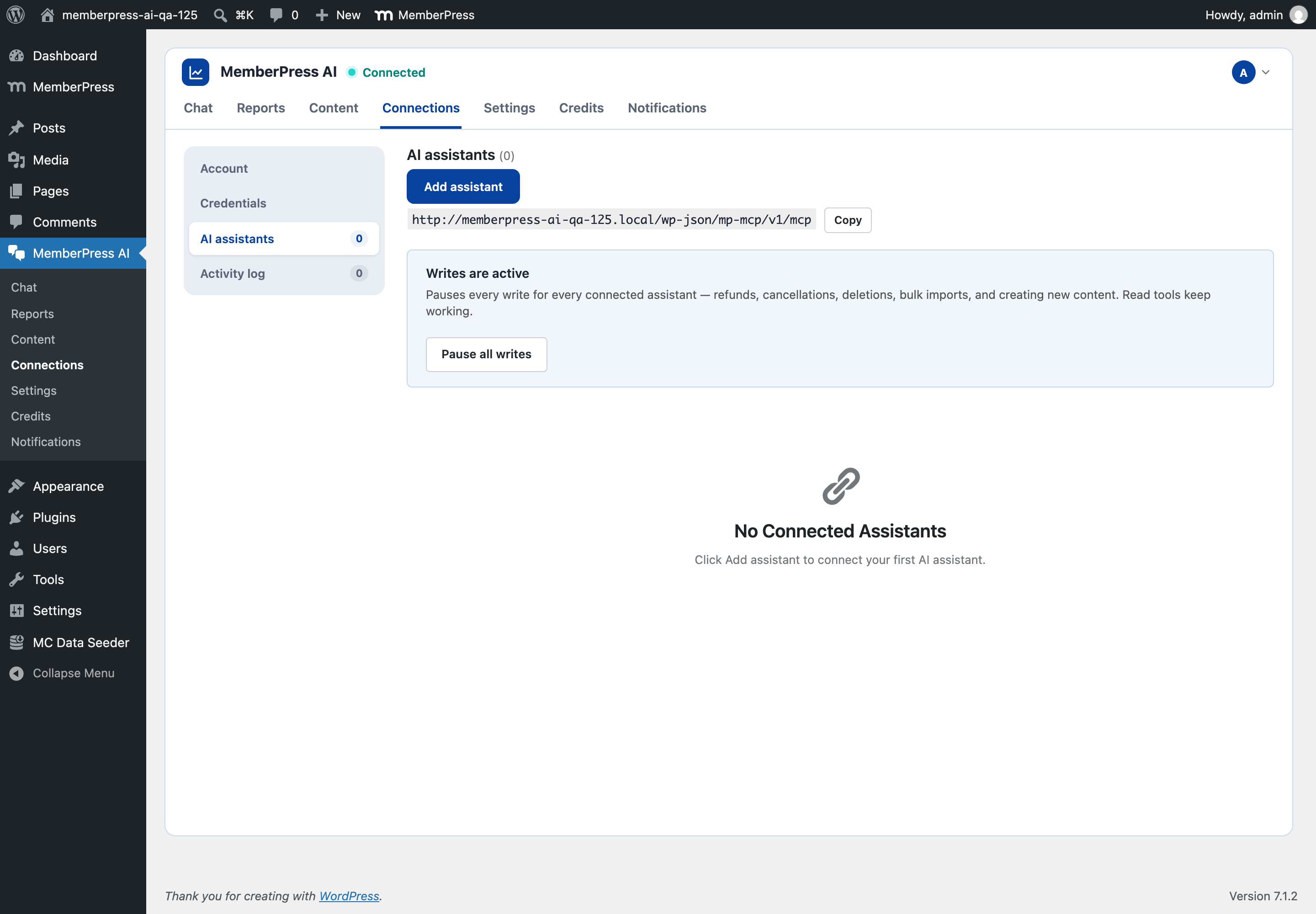
-
Click Add assistant on the same screen, then Get Started (it reads Add Another Connection if an assistant is already connected).
-
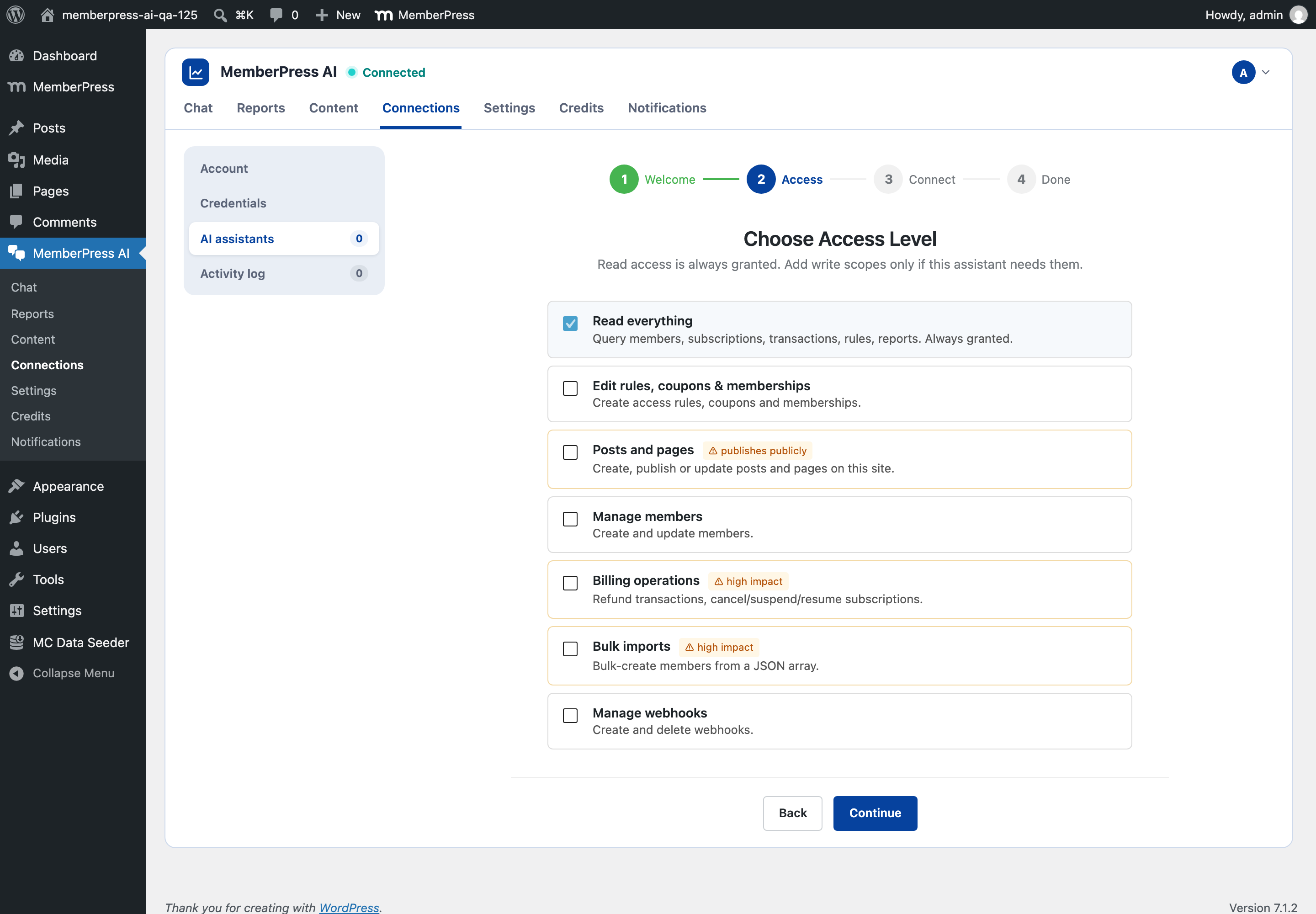
Choose an access level, which is the wizard’s second step. Reading is always granted. Write scopes appear here only when an administrator has raised Most access a new assistant can get above Read only under Rules for new assistants, under AI agents > Your assistants, and Read only is where a new install starts. Until the ceiling is raised, every assistant you connect can read and nothing more.
-
Click Continue and follow the wizard’s last two steps, Connect and Done. Paste the URL into your client as a remote MCP server when it asks. The wizard has step-by-step instructions for Claude Desktop.
-
Your client sends you to your own site to approve, signed in as yourself. The grant is listed and revocable on the same Your assistants screen.
Prefer to let MemberPress.ai do the setup for you instead? Start with Connecting your site.
Connect your client to your MemberPress.ai account
- In the MemberPress.ai app, open Settings → AI assistants and find Also connect the advisor. Copy the server address shown there. It differs by environment, so copy it from the page rather than from a screenshot.
- Add that address in your client as a remote MCP server. In claude.ai or
Claude Desktop, open Customize → Connectors, choose + Add → Add custom
connector, and paste it. In Claude Code, run
claude mcp add --transport http memberpress-ai-advisor <address>, then type/mcpto sign in. In ChatGPT, add a custom MCP connector and paste the same server address. ChatGPT picks up its OAuth callback from the server’s discovery response during setup; you do not enter a redirect URI yourself. - Your client sends you back to MemberPress.ai to approve. The consent screen
names the client, the address it will return to, and each permission it is
asking for. For ChatGPT that return address is
https://chatgpt.com/connector_platform_oauth_redirect, byte-for-byte (not a Claude-styleclaude.aiorclaude.comcallback under/api/mcp/). Read the list. You can grant fewer than it asks for. - Approve. The connection appears under Connected AI assistants in Settings → AI assistants, with the time it was last used. Revoke it there whenever you like.
Connections are per account, not per site: a client that can ask the advisor can ask about any site you have connected. If you have more than one, the assistant will list them and ask which you mean.
Two things end a connection without you revoking it. Resetting your MemberPress.ai account password revokes every client connected to your MemberPress.ai account, so reconnect them afterward. It does not touch clients connected to your site’s own endpoint; those grants live on your WordPress login and are managed there. A client that goes unused for 30 days also has to reconnect.
What your assistant can read, and what it can do
Through your MemberPress.ai account, each permission you grant unlocks a specific set of tools. Nothing outside what you granted is even visible to the client.
| Permission on the consent screen | What the assistant can then do |
|---|---|
| See your connected sites | List your sites by name, with when each last synced and whether the connection is healthy. Names and sync state only, no business data. |
| Ask the advisor about a site | Diagnose churn, review engagement, assess pricing, explain a revenue change, and benchmark against peers. Also read a site’s design state and the accepted style values, and list the guided setup flows that fit it. Report the affiliate roster with earned, paid, and owed balances and per-membership commission cost (a lower bound when a commission couldn’t be matched to a sale), and surface the one actionable finding that matters most right now, or that there is none. Real numbers from your own site, grounded in MemberPress.ai’s playbooks. |
| Generate draft content | Draft a post, page, course outline, lesson, or quiz (a quiz needs the MemberPress Course Quizzes add-on on your site, and Opal’s chat in the app doesn’t write quizzes). Each generation spends credits, and the tool description shows the price before the client calls it. Always a draft, never published. |
| Write drafts to your site | Place a finished draft in your WordPress editor: a post or page, a course with its sections, or a lesson or quiz inside a course already there (a quiz needs the MemberPress Course Quizzes add-on). Costs nothing extra. Still a draft. |
| Update how MemberPress.ai understands your site | Set or clear the site’s declared industry, business type, and goals, with a preview first and, usually, an undo afterward. Propose a design for a supported site hosted on our theme, with preview and review links. You apply or dismiss the proposal in the app. Start and advance a guided setup flow. Run a full sync of a site’s data, which counts toward your monthly manual syncs. |
| Set up a site you have just connected | Add its membership levels as drafts, then make them live to put them on sale, along with MemberPress’s Join, Checkout, Account and Login pages. First setup only, and only after it has previewed exactly what will be created. The agent is told to ask you before sending the setup confirmation. |
| Connect a site | Take a site address, check it’s a reachable WordPress install, and hand you an authorization link to approve on that site. |
| Buy credits, or a month of Pro | Starts unticked; tick it only if you want the assistant to buy them. See Agent payments for how buying works. |
Through your site’s own endpoint, the assistant can read everything the access level covers (members, subscriptions, transactions, rules, reports), and write only within the scopes you chose in the wizard.
Which actions take a confirmation, and who gives it
Reading never needs approval beyond the connection itself. Writes are gated according to what they touch. When your assistant acts for you, it gives most of these confirmations itself as it works, so tell it plainly what you want. Only you can apply a design proposal. At setup, the agent is told to ask you first; refunds and subscription changes take a second, human confirmation. In the wp-admin chat, you give them. See Which changes ask you to confirm.
- Preview, then confirm. Changing your site’s declared profile, and undoing that change, always happens in two steps. The first call returns what is there now, what would change, and a one-time confirmation token that expires in 60 seconds. Only a second call carrying that token writes anything. A hallucinated or mistaken call produces a preview, never an effect. You see the change afterwards under Connected AI assistants → Activity in Settings → AI assistants, and can usually undo it there.
- Review a design proposal. For supported sites we host on our theme, the assistant gives you a preview link and a review link to your site’s page in the app. Under Design, choose See the preview, then Apply to my site or Dismiss. The proposal and preview expire after 15 minutes. If they expire, ask for a fresh proposal. The agent cannot apply its own proposal.
- Approve on your own site. Connecting a new site never installs anything until you open the link on that site, signed in as yourself, and approve a screen naming exactly what will be installed.
- Dry run, and a second confirmation for sensitive actions. On your site’s own endpoint every write runs as a dry run first, and nothing is saved until that change is carried out. Refunds and subscription changes take a second, human confirmation on top.
Drafting content and writing drafts don’t ask twice, on purpose. A draft lands in your editor unpublished, has no public URL, and deleting it removes it. One exception: for a pricing page it also fills your MemberPress pricing page’s title and subheadline if they are empty, and deleting the draft doesn’t undo that. To hold your assistant’s posts and pages for you instead, set its connection to Ask me first under Connected AI assistants. Posts and pages it writes then wait for you in Proposals, and courses and lessons are refused.
Worked examples
Each of these is a real exchange shape. The assistant calls the tools; you never type a tool name.
Ask the advisor. “Why did revenue drop in August on my coaching site?” The assistant lists your sites, picks the one you named, and asks MemberPress.ai to explain the revenue change for August. You get the movement split into new members, expansion, contraction, and churn, measured from your own billing ledger, plus what to do about it. If your site has no billing ledger yet, the answer is a plain refusal naming what’s missing rather than an invented figure.
Draft content and place it on the site. “Write a blog post on pricing a group coaching tier, then put it in my editor.” The assistant generates the draft, which shows up as a job you can check, then writes it to your site as an unpublished post and hands you the editor link. Asking it to “write it again” reports the draft it already wrote instead of making a second one.
Change the business profile, then change your mind. “Mark this site as a coaching business.” The assistant previews the current profile (or that none was set) and the proposed one, then confirms the change itself. “Actually, undo that.” Same shape: it previews what will be restored, confirms, and the prior value comes back. If the profile changed some other way in between, the undo refuses rather than overwrite it.
Look at the design. “What style is this site using?” The assistant reports what the site is supposed to look like and what the last fleet sweep actually saw running, which can lag. “Switch it to the warm variation.” On a supported site hosted on our theme, it creates a proposal and gives you preview and review links. Open the review link to your site’s Design section, choose See the preview, then Apply to my site or Dismiss. If the 15 minutes have passed, ask for a fresh proposal. The agent cannot apply it for you.
Connect a new site. “Connect my site at example.com.” The assistant checks the address is a reachable WordPress install and gives you a link. You open it on your own site, approve once, and the assistant polls the status and tells you what was installed, what was already there, and what still needs a manual step. If the install doesn’t land, see Connection troubleshooting.
Run a guided setup. “Help me set up my first membership.” The assistant lists the flows that fit your site’s current state, starts the one you pick (or resumes one already in progress), and walks you through it a step at a time. When a step is checked against your real site and the check fails, the assistant is told so and keeps you on that step instead of pretending it’s done. See Recipes for what each flow covers.
What your assistant cannot do
- Publish content through your MemberPress.ai account. Posts, pages and courses it writes are drafts. The one exception is first setup: with the setup permission, the agent is told to ask you first. Sending the setup confirmation makes live the draft membership levels the agent added to a new site, along with MemberPress’s Join, Checkout, Account and Login pages.
- Refund, delete, cancel, or suspend through your MemberPress.ai account. Those live on your site’s own endpoint, behind a dry run and a second, human confirmation.
- Apply a design proposal. On supported hosted sites, the assistant can propose a look. Only you can apply it from your site’s Design section.
- Read a site that isn’t connected to your account, or guess at one. A site id that isn’t yours is reported as not connected.
- Invent numbers. When your site doesn’t have the data to answer, the advisor refuses and says what’s missing.
- Spend without limits. Advisor questions have a monthly allowance, tool calls are rate limited per connection, and content generation shows its credit price before the call.
- Install anything on a site you haven’t approved it on, in the app or on your own site.
- See your WordPress password, or send it anywhere.
- Keep working after you revoke it. Revocation takes effect on the very next call, not when its token happens to expire.
FAQ
Which AI clients can connect?
Any client that speaks MCP. If you only connect one thing, connect your site's own endpoint: it reads your site and builds on it, from any client. Claude (the claude.ai web app and Claude Desktop) connects to both your site's own endpoint and your MemberPress.ai account out of the box. ChatGPT can also use your MemberPress.ai account when OAuth completes on https://chatgpt.com/connector_platform_oauth_redirect — that address must match byte-for-byte (scheme, host, and path only; no trailing slash, query, or fragment). Claude Code connects to both, signing in through a callback on your own machine. Cursor connects to your site's endpoint. Other clients connect to your site's endpoint if their callback address is allowed there; the plugin exposes a filter for that.
Can my assistant publish something or change my site without asking?
Yes, within the access you gave it: it confirms most changes itself rather than asking you, so tell it plainly what you want. Through your MemberPress.ai account it writes drafts. A pricing-page draft can also fill empty live MemberPress pricing-page titles and subheadlines; deleting the draft doesn't undo that. A business profile change previews first and can usually be undone. At first setup, the agent is told to ask you first; the setup confirmation makes live the draft membership levels it added to a new site, along with MemberPress's Join, Checkout, Account and Login pages. For supported hosted sites, design changes are proposals with preview and review links. Proposals expire after 15 minutes. You apply or dismiss them under Design on your site's page; the agent cannot apply them. On your site's own endpoint every write runs as a dry run first, and refunds and subscription changes take a second, human confirmation. Afterwards, see what it did under Connected AI assistants → Activity in Settings → AI assistants.
Can you reach into my Claude or ChatGPT for me?
No. Connecting your own AI client is always a one-click authorize that you do in your client, approved on your own login. We can set your site up server-side; we can't reach into your ChatGPT or Claude account.